海上列车:用 Three.js 写一片安静的海 Sea Train: Writing a Quiet Ocean in Three.js

海上列车最早只是一句话:一米深的静水漫过铁轨,一列四节车厢从水面滑过去;窗户是画面里仅剩的暖色,天空和水已经分不清了。完整场景源码在 Makone。
这句话可以拆成几组关系:长焦把列车压成一条暗线,水面反射同一片天空,电线在重力下自然下垂,时间同时推动太阳和列车。场景的数学并不复杂,但每一项都得互相接得上。
先定一张照片,不先铺世界
镜头先定下来,场景范围随后才有答案。相机用 15.5° 的窄视角,大约是全画幅 85 mm。它离轨道横向 22 米,朝轨道方向斜看。长焦会把 71.8 米的四节编组压成一条暗线,刚好能和地平线对抗。
const FOV = 15.5;
const CAM_POS = new THREE.Vector3(-52, 0.62, 22);
const CAM_TGT = new THREE.Vector3(115.5, 8.64, -6.93);

const camera = new THREE.PerspectiveCamera(
  FOV, width / height, 0.8, 9000
);
camera.position.copy(CAM_POS);
camera.lookAt(CAM_TGT);
广角在这里不好用。它会让车头像一块大玩具,末节车厢缩成针尖;轨道的透视也会抢走水面的安静。窄视角虽然不够“沉浸”,但它把所有东西都按在同一个平面上。
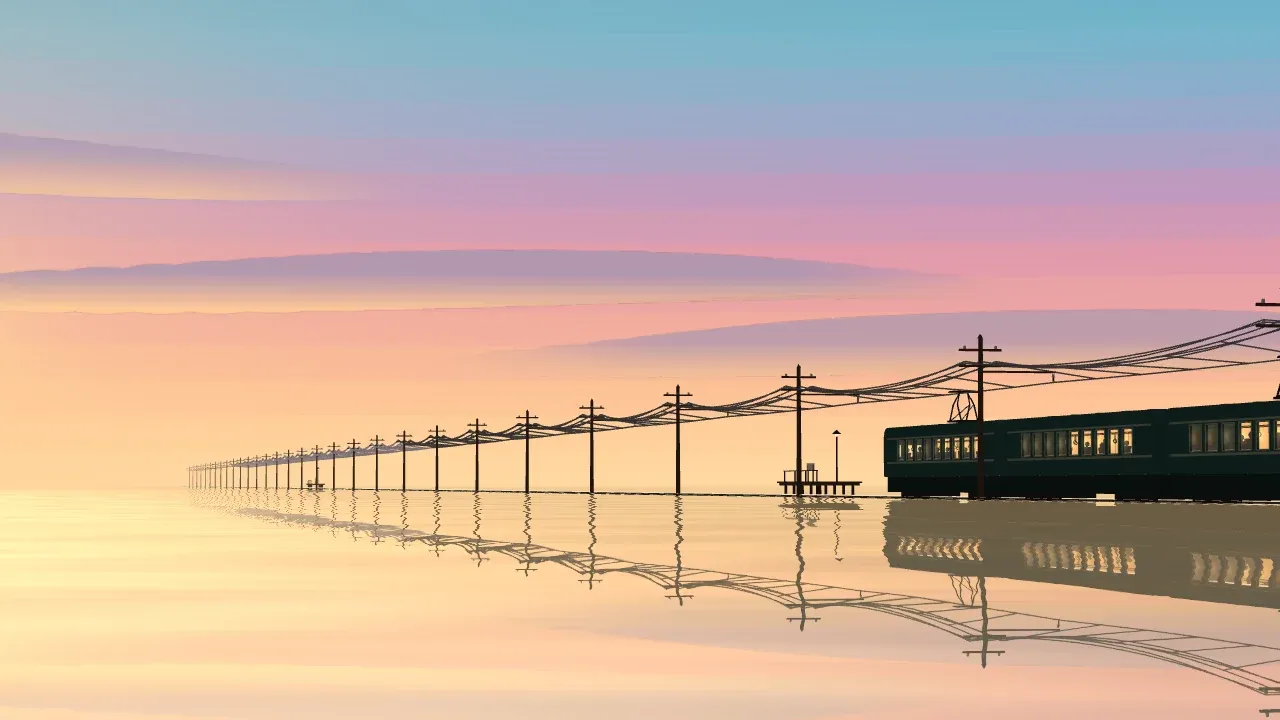
这个角度没有靠近列车。留白才是主体,车只是那条把画面压住的暗线。
天空先画,水直接去照它
天空没有用物理大气。一张带十个色标的 1 像素渐变纹理,在 shader 里按视线仰角取色,再轻微分段。镜头实际只看得到地平线上方约十度,所以颜色最密的地方也放在那里。
const SKY_STOPS = [
  [0.00, '#ffdca6'], [0.11, '#fbb994'],
  [0.25, '#e199ac'], [0.40, '#97a8cb'],
  [0.68, '#4f8fb5'], [1.00, '#3c6b98'],
];

// fragment shader, condensed
float elevation = degrees(asin(clamp(dir.y, -1.0, 1.0)));
float p = elevation <= 14.0
  ? max(elevation, 0.0) / 14.0 * 0.72
  : 0.72 + 0.28 * smoothstep(14.0, 90.0, elevation);

float bands = 26.0;
p = mix(p, (floor(p * bands) + 0.5) / bands, 0.62);
vec3 sky = texture2D(uRamp, vec2(p, 0.5)).rgb;
水面用 Reflector,不是另配一套“差不多”的渐变。它真的从水下虚拟相机重画同一片天空,所以地平线两边不会出现接缝。
const waterGeo = new THREE.PlaneGeometry(5200, 5200);
const water = new Reflector(waterGeo, {
  textureWidth: 2048,
  textureHeight: 1152,
  clipBias: 0.0006,
  shader: WaterShader,
});

water.rotation.x = -Math.PI / 2; // 旋转对象,别预先旋转 geometry
water.position.y = 0;
scene.add(water);这个注释值得单独说:Reflector 从对象的 matrixWorld 求镜面法线。若先对 geometry 调 rotateX(),平面看着已经躺平,反射相机却仍按竖直镜子计算。天空照样能出现,很容易误以为成功了;站在水上的列车没有倒影,才会暴露问题。
水纹只动一点点
最初的波纹太强,倒影像大理石。屏幕空间采样偏移最后压到 0.11,远处的坡度还会逐渐归零。反射也混入一点地平线颜色,免得水下再出现一列同样黑、同样清楚的车。
vec2 uv = clamp(vUv.xy / vUv.w + waveSlope * 0.11,
                0.0015, 0.9985);
vec3 reflection = texture2D(tDiffuse, uv).rgb;
reflection = mix(reflection, uHorizon, 0.17);

vec3 color = mix(uDeep, reflection, fresnel);
color = mix(color, uHorizon,
            smoothstep(150.0, 1300.0, distance) * 0.40);
阳光在水上的金色长路是另外一层窄楔形高光。它放在列车右边,因为放左边时会被列车自己的倒影挡住。这个调整不是配色问题,是反射方向的问题。
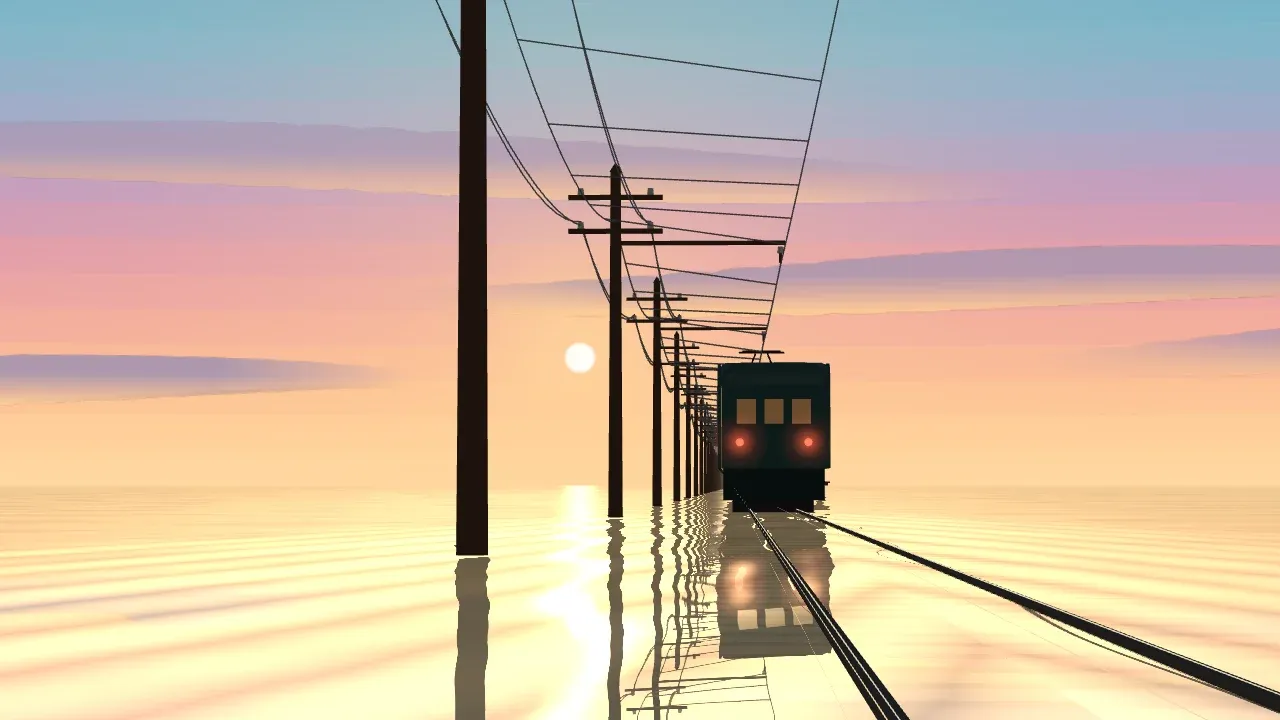
这个机位不适合当封面,却能检查铁轨有没有浮起来、太阳路是否穿过列车,以及电线是不是真的挂在杆上。
电线一定要下垂
场景里最细的东西最容易显假。一根从杆顶直连到下一根杆顶的线,会让整个世界像塑料模型。30 米跨度、0.8 米垂度由悬链线计算;参数 a 用几轮 Newton 迭代求出。
const SPAN = 30;
const SAG = 0.8;

let a = (SPAN * SPAN) / (8 * SAG);
for (let i = 0; i < 6; i++) {
  const u = SPAN / (2 * a);
  const f = a * (Math.cosh(u) - 1) - SAG;
  const df = Math.cosh(u) - 1 - u * Math.sinh(u);
  a -= f / df;
}

const catenary = (u) =>
  a * (Math.cosh((u - 0.5) * SPAN / a) - Math.cosh(SPAN / (2 * a)));
真正 12 mm 粗的电线,在一百米外远小于一个像素,所以这里用 LineSegments2 画成约 1.4 像素宽。宽度是视觉上的让步,下垂曲线不能让步。前者让线看得见,后者决定它像不像有重量。
列车是壳,不是一块长方体
列车主体故意用了接近黑色的深青。暖色全部留给车窗、灯和水上的太阳路。车厢也不能是一整块挖洞的实体;斜着看时,2.7 米厚的洞会变成隧道,把内饰完全挡住。
车体最后做成两层 70 mm 的侧皮,再加上车顶、地板和端墙。窗后才放暖色内壁和顶灯。
const SKIN = 0.07;
const insideHalfWidth = CAR_W / 2 - SKIN;

const windowLight = new THREE.MeshBasicMaterial({ color: 0xffcf87 });
const trainBody = new THREE.MeshStandardMaterial({
  color: 0x2a4c4c, roughness: 0.76, metalness: 0.04,
});

const skin = new THREE.ExtrudeGeometry(sideOutlineWithWindows(), {
  depth: SKIN,
  bevelEnabled: false,
  steps: 1,
});

const nearSide = new THREE.Mesh(skin.clone(), trainBody);
nearSide.position.z = insideHalfWidth;
const farSide = new THREE.Mesh(skin.clone(), trainBody);
farSide.position.z = -CAR_W / 2;
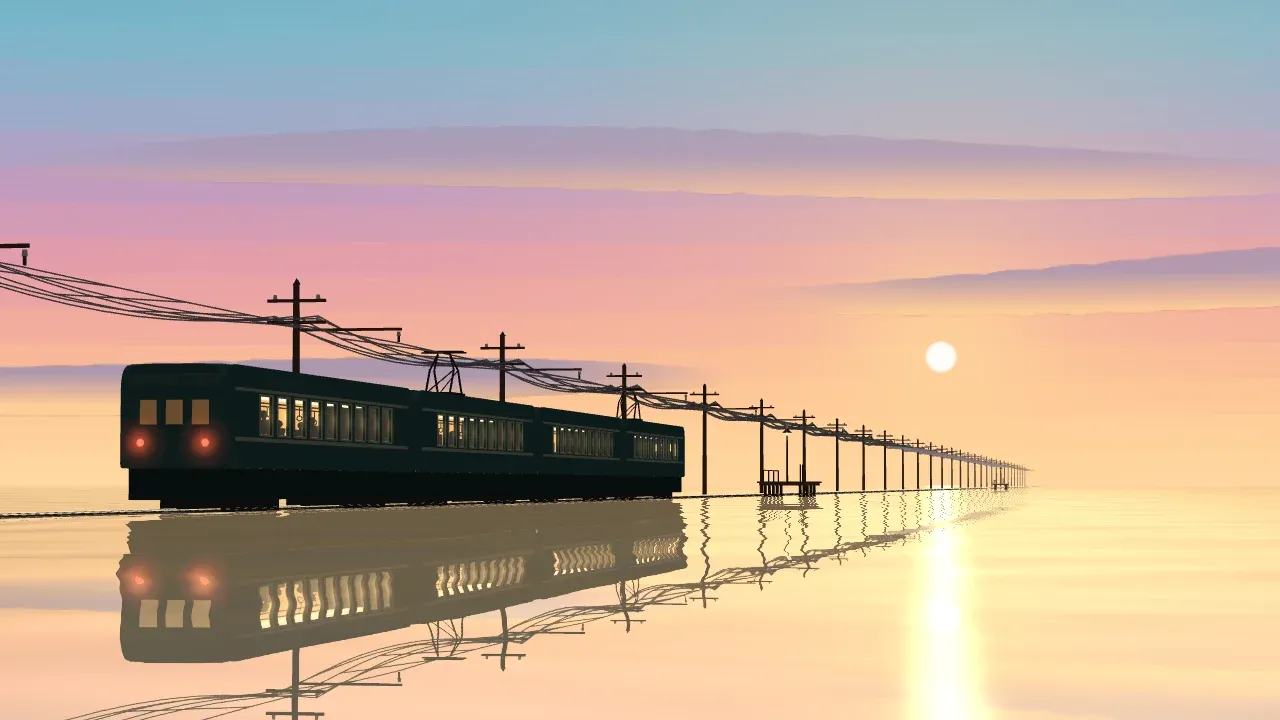
body.add(nearSide, farSide);最后让时间也只认一个输入。apply(t) 同时设置太阳高度、列车位置和尾流,seekTo(0.5) 每次都会得到同一帧。反复比较构图时,这比“看起来一直在动”重要得多。
function apply(t) {
  const u = THREE.MathUtils.clamp(t / duration, 0, 1);
  setSunElevation(THREE.MathUtils.lerp(3.4, 2.1, u));
  train.position.x = centerAt(u);
  water.material.uniforms.uWake.value.set(train.position.x - consist / 2, speedAt(u));
}

function seekTo(progress) {
  time = THREE.MathUtils.clamp(progress, 0, 1) * duration;
  apply(time);
}
回头看,场景里真正起作用的只有几组关系:长焦压平空间,水反射同一片天空,电线按重力下垂,车窗从薄薄的车皮后透出来。它们都能写成数学;Three.js 做的,是让这些数学在同一帧里同时成立。
Sea Train began as one sentence: a metre of still water over the rails and a four-car train sliding across it; the windows are the only warm thing left, and the sky and water have stopped being two things. The complete scene source is in Makone.
That sentence breaks down into a few relationships. A long lens compresses the train into a dark line. The water reflects the same sky. The wires sag under gravity. Time moves the sun and train together. None of the mathematics is especially complicated, but every part has to agree with the others.
Choose one photograph before building the world
The lens comes first; only then does the required extent of the scene become clear. The camera has a narrow 15.5° field of view, roughly an 85 mm lens on full frame. It sits 22 metres to the side of the track and looks obliquely along it. The long lens presses a 71.8-metre consist into a dark horizontal strip strong enough to hold its own against the horizon.
const FOV = 15.5;
const CAM_POS = new THREE.Vector3(-52, 0.62, 22);
const CAM_TGT = new THREE.Vector3(115.5, 8.64, -6.93);

const camera = new THREE.PerspectiveCamera(
  FOV, width / height, 0.8, 9000
);
camera.position.copy(CAM_POS);
camera.lookAt(CAM_TGT);
A wide lens did not work here. It made the near end of the train feel like a toy and shrank the last car to a pin. The track perspective also became louder than the still water. The narrow view is less “immersive,” but that flatness is exactly what the composition needs.
The camera never gets close to the train. The empty water is the subject; the train is the dark line that holds it down.
Draw the sky, then let the water photograph it
There is no physical atmosphere. A one-pixel ramp texture holds ten colour stops; the shader samples it by viewing elevation and lightly posterises the result. This lens only sees about ten degrees above the horizon, so most of the colour change lives there too.
const SKY_STOPS = [
  [0.00, '#ffdca6'], [0.11, '#fbb994'],
  [0.25, '#e199ac'], [0.40, '#97a8cb'],
  [0.68, '#4f8fb5'], [1.00, '#3c6b98'],
];

// fragment shader, condensed
float elevation = degrees(asin(clamp(dir.y, -1.0, 1.0)));
float p = elevation <= 14.0
  ? max(elevation, 0.0) / 14.0 * 0.72
  : 0.72 + 0.28 * smoothstep(14.0, 90.0, elevation);

float bands = 26.0;
p = mix(p, (floor(p * bands) + 0.5) / bands, 0.62);
vec3 sky = texture2D(uRamp, vec2(p, 0.5)).rgb;
The water uses Reflector, not a second hand-matched gradient. It renders the same sky from a virtual camera below the surface. Since both sides of the horizon come from one image, there is no colour seam to hide.
const waterGeo = new THREE.PlaneGeometry(5200, 5200);
const water = new Reflector(waterGeo, {
  textureWidth: 2048,
  textureHeight: 1152,
  clipBias: 0.0006,
  shader: WaterShader,
});

water.rotation.x = -Math.PI / 2; // rotate the object, not the geometry
water.position.y = 0;
scene.add(water);
That comment matters. Reflector derives its mirror normal from the object’s matrixWorld. If you rotate the geometry first, the plane appears horizontal while the reflection camera still solves a vertical mirror. The sky will show up anyway, which makes the mistake easy to miss. Objects standing on the water will have no reflection.
Move the water less than you think
The first waves were too strong and turned the reflection into marble. The screen-space sample offset settled at 0.11, while the slope fades to zero in the distance. The reflected image is also mixed slightly toward the horizon colour, so the lower half does not contain a second train as black and crisp as the subject.
vec2 uv = clamp(vUv.xy / vUv.w + waveSlope * 0.11,
                0.0015, 0.9985);
vec3 reflection = texture2D(tDiffuse, uv).rgb;
reflection = mix(reflection, uHorizon, 0.17);

vec3 color = mix(uDeep, reflection, fresnel);
color = mix(color, uHorizon,
            smoothstep(150.0, 1300.0, distance) * 0.40);
The gold road on the water is a separate, narrow wedge of specular light. It sits to the right of the train because the train’s own reflection blocked it on the left. That was not a palette problem. It was reflection geometry.
This is not the cover angle, but it catches floating rails, a sun road passing through the train, and wires that miss their poles.
Let the wires sag
The thinnest objects can make the whole scene feel fake. A straight segment from one pole top to the next turns the world into a plastic model. A catenary provides the 30-metre span and 0.8 metres of sag; a few Newton iterations find the parameter a.
const SPAN = 30;
const SAG = 0.8;

let a = (SPAN * SPAN) / (8 * SAG);
for (let i = 0; i < 6; i++) {
  const u = SPAN / (2 * a);
  const f = a * (Math.cosh(u) - 1) - SAG;
  const df = Math.cosh(u) - 1 - u * Math.sinh(u);
  a -= f / df;
}

const catenary = (u) =>
  a * (Math.cosh((u - 0.5) * SPAN / a) - Math.cosh(SPAN / (2 * a)));
A real 12 mm wire is far below one pixel at a hundred metres, so LineSegments2 draws these at about 1.4 pixels. The width is a visual concession; the sag is not. One keeps the line visible, while the other gives it weight.
Build the train as a shell
The body is deliberately near-black teal. Every warm colour is reserved for windows, lamps, and the sun path on the water. A carriage cannot be one solid block with holes cut through it, either. Seen at a shallow angle, a 2.7-metre-deep opening becomes a tunnel and hides the entire interior.
The final car uses two 70 mm side skins, then a roof, floor, and end walls. Warm interior walls and ceiling lights sit behind those skins.
const SKIN = 0.07;
const insideHalfWidth = CAR_W / 2 - SKIN;

const windowLight = new THREE.MeshBasicMaterial({ color: 0xffcf87 });
const trainBody = new THREE.MeshStandardMaterial({
  color: 0x2a4c4c, roughness: 0.76, metalness: 0.04,
});

const skin = new THREE.ExtrudeGeometry(sideOutlineWithWindows(), {
  depth: SKIN,
  bevelEnabled: false,
  steps: 1,
});

const nearSide = new THREE.Mesh(skin.clone(), trainBody);
nearSide.position.z = insideHalfWidth;
const farSide = new THREE.Mesh(skin.clone(), trainBody);
farSide.position.z = -CAR_W / 2;
body.add(nearSide, farSide);
Time gets one input as well. apply(t) sets the sun elevation, train position, and wake together. seekTo(0.5) returns the same frame every time, which matters far more when comparing the composition than vaguely continuous motion.
function apply(t) {
  const u = THREE.MathUtils.clamp(t / duration, 0, 1);
  setSunElevation(THREE.MathUtils.lerp(3.4, 2.1, u));
  train.position.x = centerAt(u);
  water.material.uniforms.uWake.value.set(train.position.x - consist / 2, speedAt(u));
}

function seekTo(progress) {
  time = THREE.MathUtils.clamp(progress, 0, 1) * duration;
  apply(time);
}
In the finished scene, only a few relationships are doing the real work: the long lens flattens space, the water reflects the same sky, gravity bends the wires, and the windows shine through a thin carriage skin. Each can be written as mathematics. Three.js lets all of them hold true in the same frame.